DealsRky Editorial
Lenovo ThinkPad Thunderbolt 4 Dock: A Practical Buyer's Guide for Dual-Monitor Setups
Looking for a docking station that can handle dual 4K monitors without the usual setup headaches? This guide walks through what matters most when choosing a ThinkPad dock for everyday productivity.
What This Dock Does and Who It's For
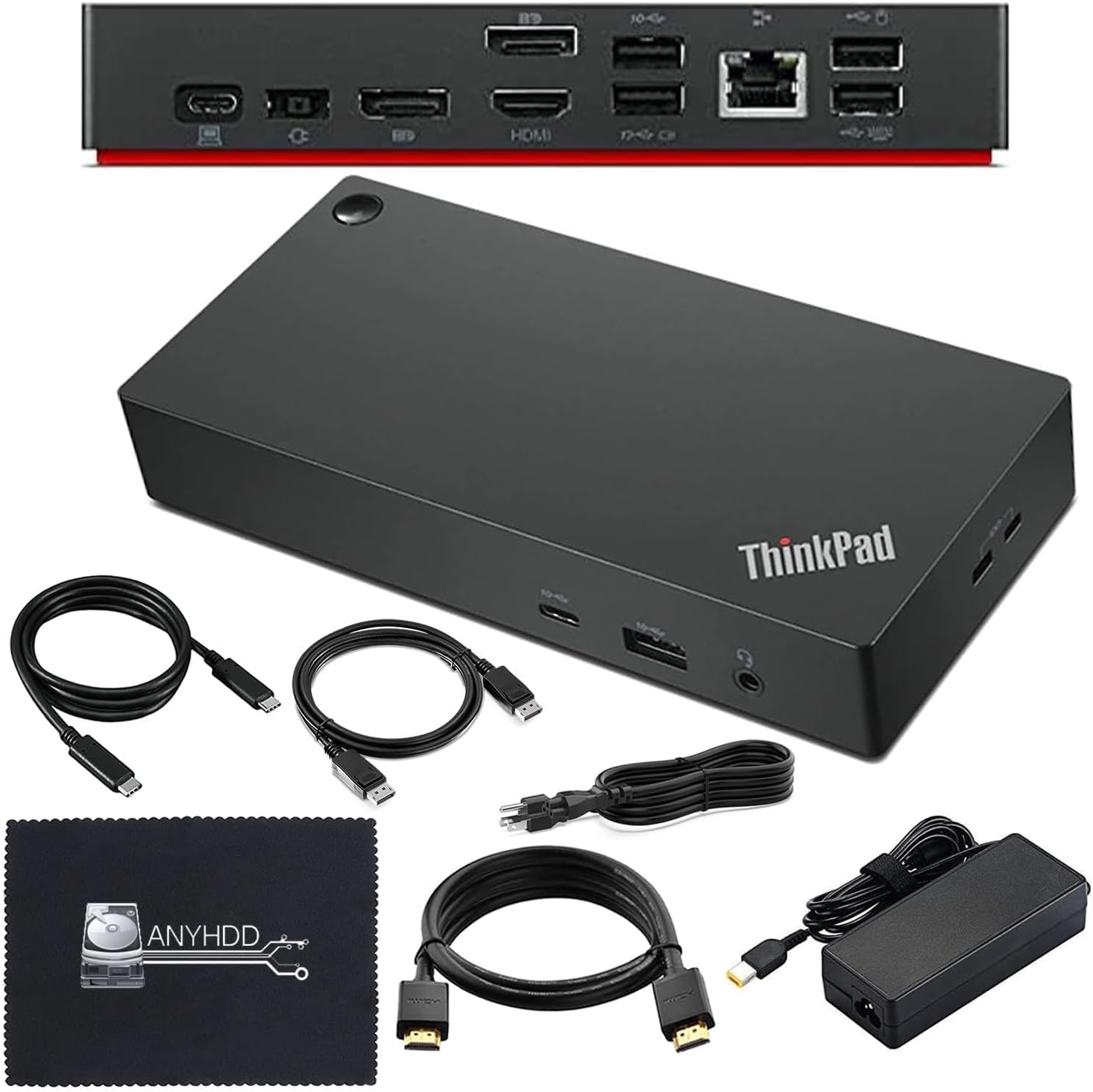
The Lenovo ThinkPad Thunderbolt 4 Workstation Dock (model 40AY0090US) is a single-cable solution that transforms a compatible laptop into a full desktop workstation. With one USB-C connection, you get video outputs, peripheral ports, wired networking, and power delivery all routed through one hub. The included 90W AC adapter handles power delivery, which means you don't need a separate charger cluttering your desk.
This dock makes the most sense for people who work at a fixed desk and regularly connect multiple displays, external storage, and accessories. If you frequently dock and undock your laptop throughout the day, the simplicity of a single-cable connection cuts down on repeated plugging and unplugging. The target user is someone who wants a reliable, always-ready workspace without needing to configure settings each time they sit down.
Key Features Worth Understanding
Connectivity that covers the basics
The dock provides a range of ports designed for typical office peripherals: USB-A connections for keyboards and mice, USB-C ports for newer devices, audio jacks, and Ethernet for stable wired internet. For most people, this covers daily needs without requiring additional adapters or hubs.
Dual 4K display support
The HDMI and DisplayPort outputs support 4K resolution at 60Hz, which handles modern monitors without noticeable lag or resolution scaling. If you use dual monitors for document work, reference materials, or design tasks, this resolution is sufficient for sharp text and clear imagery.
Power delivery at 90W
The integrated 90W power adapter charges most compatible laptops while they're docked. This eliminates the need for a separate power brick sitting on your desk. However, if your laptop requires more than 90W for peak charging speeds, you may notice slower charging during heavy use.
Included cables
The package includes a USB-C cable and what appears to be a 4K-capable video cable based on the listing details. Having the necessary cables included means you can set up immediately without making a separate purchase.
What to Consider Before Buying
Compatibility with your laptop
Thunderbolt 4 docks work best with laptops that have Thunderbolt 4 ports. Older laptops with USB-C but no Thunderbolt support may have limited functionality. Checking your laptop's specifications before purchasing prevents the frustration of discovering mismatched ports after the box arrives.
Cable length limitations
The included cables have fixed lengths. If your desk setup requires longer runs to your monitor or power outlet, you may need to purchase extension cables. Positioning your dock close enough to your monitors and power source helps avoid cable management issues.
Device ecosystem
If most of your peripherals are USB-A devices, you'll appreciate the number of USB-A ports available. However, if you've already moved to USB-C accessories, check that the dock provides enough USB-C ports for your current and near-future needs.
Monitor arrangement
Dual monitor setups work best when both monitors sit at similar heights and distances. The dock handles the video signals reliably, but physical monitor positioning affects daily comfort. Consider whether your current monitor arrangement supports a two-display workflow or if you need additional monitor arms or stands.
Practical Buying Considerations
Desk space
The dock itself takes up minimal desk space, but you'll need room for the unit, its power adapter, and cable routing. A clean, organized desk setup makes the single-cable dock more effective since you hide most connections behind the scenes.
Operating system
Thunderbolt 4 docks typically work with Windows and macOS without requiring special software. However, some advanced features like wake-on-LAN or per-port customization may require driver installation. If you prefer a plug-and-play experience without additional software, verify the setup process matches your preferences.
Monitor configuration
For the best dual-monitor experience, use both the HDMI and DisplayPort outputs rather than daisy-chaining displays. Direct connections to each port typically provide more stable performance than chained configurations.
Price vs. needs
This dock sits in the mid-range category for Thunderbolt 4 docks. If you only occasionally connect to external displays, a simpler USB-C hub may suffice. However, for daily dual-monitor use with power delivery, the integrated adapter and comprehensive port selection justify the investment for users who depend on a reliable desktop experience.
Related Picks for a Complete Workspace
If you're building out a complete desk setup, a few complementary products from our catalog may prove useful:
- The HDMI ARC Audio Extractor Adapter (B0F9Y9YZW3) helps if you want to route display audio to external speakers or sound bars that don't support direct HDMI connections.
- For those printing documents, the YCDHYC GPR-66 Black Toner Cartridge (B0FRLBCKY9) offers a compatible option for Canon imageRUNNER ADVANCE printers, giving you a straightforward replacement when supplies run low.
- The Ultrasonic Retainer Cleaner Machine (B0DY4T42GN) addresses a different need entirely—dental hygiene accessories—but illustrates the range of everyday items available alongside productivity gear.
Final Thoughts
A docking station works best when it disappears into your workflow. You want reliable connections, decent power delivery, and enough ports to handle your peripherals without constantly swapping cables. The Lenovo ThinkPad Thunderbolt 4 Dock delivers on these fundamentals for users with compatible laptops and dual-monitor desk setups.
Before purchasing, confirm your laptop supports Thunderbolt 4 and that your monitor arrangement fits the available ports. Taking a few minutes to verify compatibility prevents common setup frustrations and ensures the dock serves you well over time.
Important note: Prices, availability, and shipping details on Amazon can change frequently. We recommend checking the current listing to confirm the price, confirm stock status, and review any applicable warranty or return policies before making a purchase decision.
Featured product
40AY0090US Lenovo Thinkpad Docking Station Dual Monitor - Supports 4K Display, Thinkpad Dock with 90W Adapter, HDMI, DisplayPort, USB C Cables & Cloth - Lenovo Docking Station
This article was generated around our US catalog entry for this product, so you can compare the buying angle with the actual listing before deciding.
Browse more smart picks
Continue exploring our curated deal pages and product breakdowns for more practical buying guidance.
More US buying guides
These articles are prioritized for shoppers browsing from the same marketplace region.